AP Suite Access Program Instructions
Thank you for your interest in the AP Suite Access Program. This program provides the standalone IVAS 6 data analysis module of AP Suite. It does not include the ACC system control software or the database modules.
STEP 1
Please complete the form below to request a download of AP Suite.
Please review the PDFs for computer requirements for IVAS 6.
STEP 2
Install the IVAS 6 module (IVAS 6.#.#.## Installer.exe). This should take just a few minutes. The computer that the license request key is created on is the ONLY computer that the license will work with. It cannot be transferred so pick the computer you do this process on with care.
STEP 3
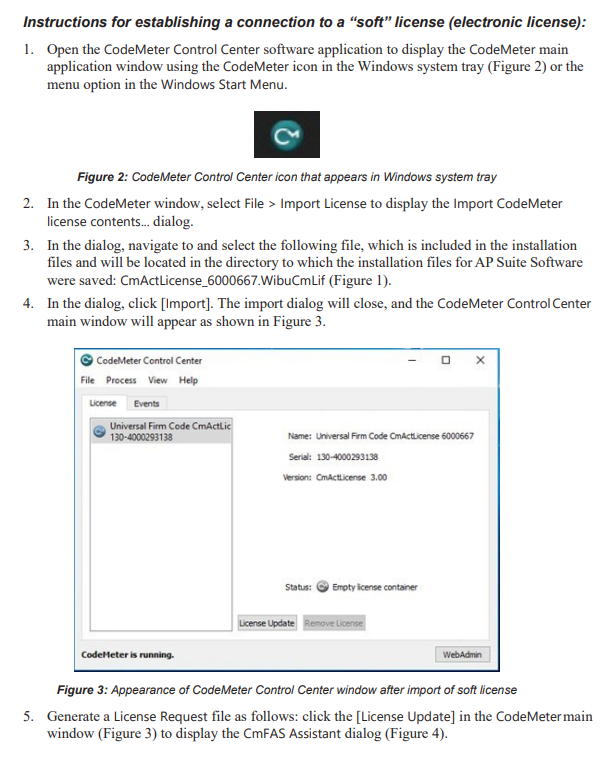
Follow the instructions below to generate a license request key.
Note, the Codemeter licensing application included with the IVAS 6 installation may already be running in the windows system tray (see below); if not, start the software from the windows start menu and then continue below.

STEP 4
After completing the above, send the Codemeter license file to: APT.Access@ametek.com and CAMECA will create a license file and email it to you. These requests are process in batches and may take two weeks to complete.
STEP 5
You will then need to import that license file into CodeMeter Control Center, and your system will be licensed for use.
From CodeMeter Control Center, select File->Import License… and browse to the *.WibuCmRaU file then click on the Import button. You should get a confirmation message box when the license import completes.
-Verify the license features by clicking the WebAdmin button to view the licensed feature codes.
Enjoy your free data analysis software license! We look forward to hearing about your projects!
